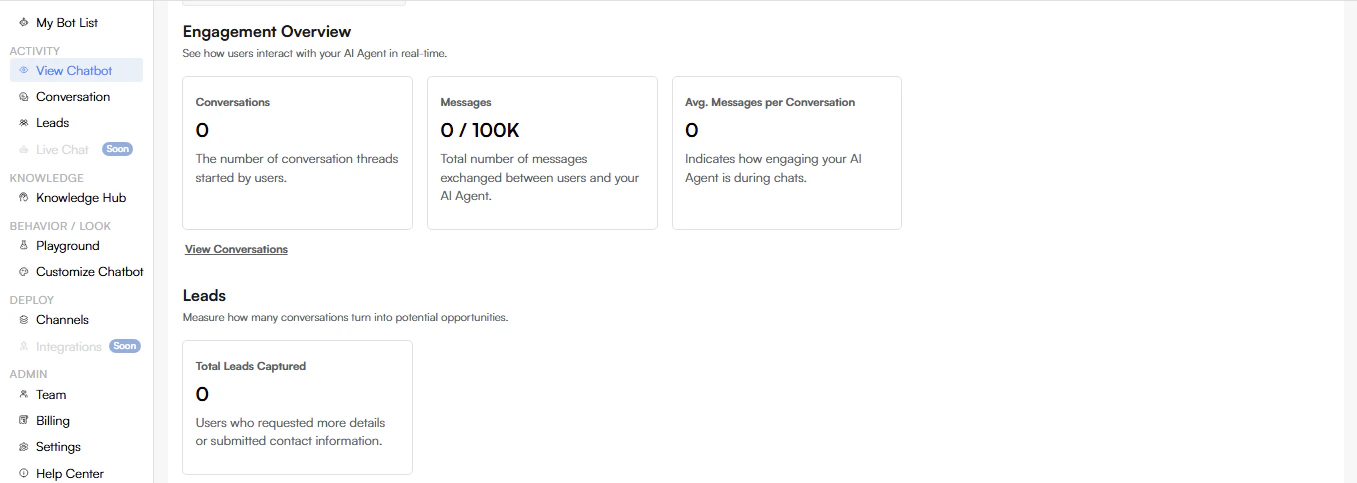
**View Chatbot ** Engagement Overview The Engagement Overview page provides real-time insights into how users interact with your AI Agent. It helps you monitor conversations, message volume, engagement quality, and lead generation at a glance. Page Overview Conversations Metric: Conversations Description: Displays the total number of conversation threads started by users. What it tells you:
  • Overall chatbot usage
  • How often users initiate chats
Messages Metric: Messages (e.g., 0 / 100K) Description: Shows the total number of messages exchanged between users and your AI Agent within the current usage limit. What it tells you:
  • Chat volume
  • Message usage against your plan limits
Avg. Messages per Conversation Metric: Avg. Messages per Conversation Description: Indicates how engaging your AI Agent is during chats. What it tells you:
  • Depth of conversations
  • User engagement quality
Higher values generally indicate more meaningful interactions. View Conversations Action: View Conversations Description: Opens the detailed conversation history, allowing you to review individual chat threads and user interactions. Leads The Leads section measures how effectively conversations convert into potential opportunities. Total Leads Captured Metric: Total Leads Captured Description: Shows the number of users who requested more information or submitted their contact details through the chatbot. What it includes:
  • Lead form submissions
  • Users requesting follow-up
How to Use This Page
  • Monitor chatbot adoption and activity
  • Track engagement trends over time
  • Identify opportunities to improve AI Tone or responses
  • Measure lead generation effectiveness
Screenshot2026 01 01222835
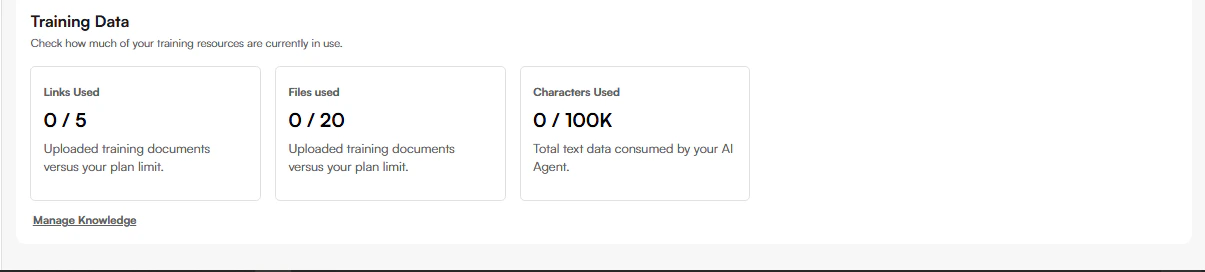
Training Data The Training Data section provides an overview of how much knowledge content your AI Agent is currently using. It helps you monitor resource usage and stay within your plan limits. Page Overview The Training Data section displays three usage cards:
  • Links Used
  • Files Used
  • Characters Used
Each card shows current usage versus your plan limit. Links Used Metric: Links Used (e.g., 0 / 5) Description: Displays the number of website links added as training sources compared to your plan limit. What it includes:
  • Crawled webpages
  • Online documentation links
Files Used Metric: Files Used (e.g., 0 / 20) Description: Displays the number of uploaded training documents compared to your plan limit. What it includes:
  • PDFs
  • Text files
  • Other supported document formats
Characters Used **Metric: **Characters Used (e.g., 0 / 100K) Description: Displays the total amount of text data consumed by your AI Agent. What it tells you:
  • Overall size of your training data
  • Remaining capacity before reaching plan limits
Manage Knowledge Action: Manage Knowledge **Description: **Opens the Knowledge Hub, where you can:
  • Add or remove links
  • Upload or delete files
  • Update existing training data
Screenshot2026 01 01224533