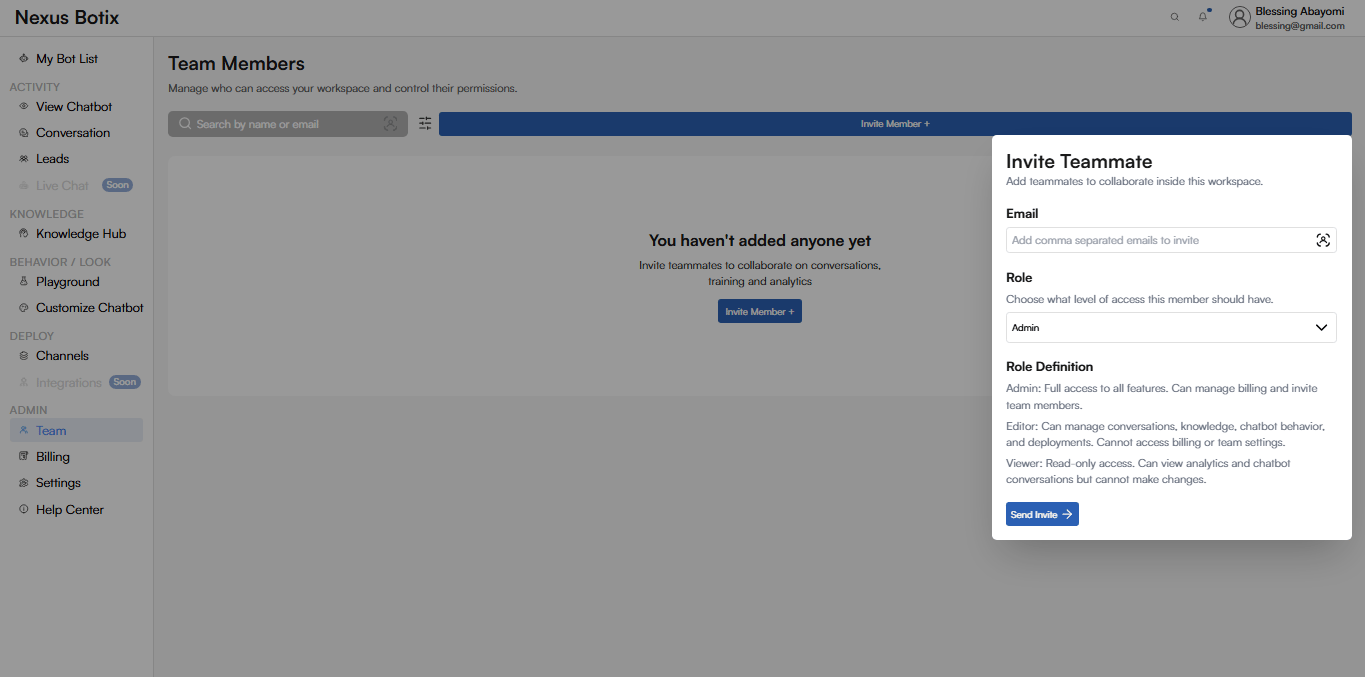
Team MembersThe Team Members page allows you to manage who can access your Nexus Botix workspace and control their permissions. This ensures secure collaboration across conversations, training, and analytics.Page OverviewThe Team Members page enables you to:
Invite teammates to your workspace
Assign roles and permission levels
Search and manage existing members
When no members have been added, a prompt is displayed encouraging you to invite teammates.Team Member ListSearch**Field: **Search by name or emailDescription: Allows you to quickly find existing team members once they have been added.Invite MemberInvite Member ButtonAction:Invite Member +Description: Opens the Invite Teammate panel where you can add new members to the workspace.Invite Teammate PanelThe Invite Teammate panel slides in from the right and contains the following fields:EmailField:EmailDescription: Enter one or more email addresses to invite teammates.RoleField:RoleDescription: Select the level of access the invited member should have.Available Roles:
Admin
Full access to all features. Can manage billing and invite team members.
Editor
Can manage conversations, knowledge, chatbot behavior, and deployments. Cannot access billing or team settings.
Viewer
Read-only access. Can view analytics and chatbot conversations but cannot make changes.Send InviteAction:Send Invite**Description: **Sends an invitation email to the specified addresses. Invited users will gain access once they accept the invitation.