> ## Documentation Index
> Fetch the complete documentation index at: https://docs.nexusbotix.io/llms.txt
> Use this file to discover all available pages before exploring further.
# Whatsapp and Facebook Integration
**Overview of the Channels Page**
This page allows you to connect your Nexus Botix AI chatbot to platforms where customers already communicate with you. From the image, three channels are available:
* Website
* WhatsApp
* Facebook Messenger
Each channel has a “Connect →” button and shows a status like “Not connected” until setup is completed.
**How to Integrate Nexus Botix with WhatsApp Business**
1. **Navigate to Channels**
* From the left-hand menu, click Deploy → Channels.
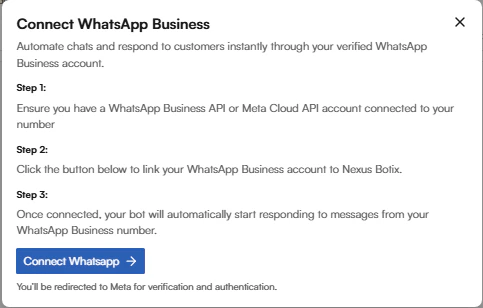
2. **Select WhatsApp**
* Locate the WhatsApp card (middle option).
* You will see a brief description:
“Connect WhatsApp Business”
 3. **Complete WhatsApp Business Setup**
* You will be guided to:
* Link a WhatsApp Business account
* Verify your phone number
* Grant required permissions to Nexus Botix
4. **Activate the Bot**
* Once connected, the status will change from Not connected to Connected.
* Your AI chat agent will now automatically respond to customer messages on WhatsApp.
**How to Integrate Nexus Botix with Facebook Messenger**
1. **Navigate to Channels**
* From the left menu, click Deploy → Channels.
2. **Select Messenger**
* Locate the Messenger card (right option).
* The description states:
“Connect Facebook Messenger”
3. **Complete WhatsApp Business Setup**
* You will be guided to:
* Link a WhatsApp Business account
* Verify your phone number
* Grant required permissions to Nexus Botix
4. **Activate the Bot**
* Once connected, the status will change from Not connected to Connected.
* Your AI chat agent will now automatically respond to customer messages on WhatsApp.
**How to Integrate Nexus Botix with Facebook Messenger**
1. **Navigate to Channels**
* From the left menu, click Deploy → Channels.
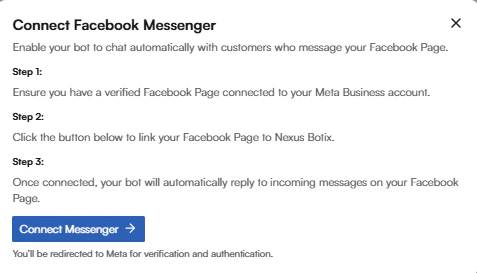
2. **Select Messenger**
* Locate the Messenger card (right option).
* The description states:
“Connect Facebook Messenger”
 3. **Link Your Facebook Page**
* Log in to Facebook when prompted.
* Select the Facebook Page you want the chatbot to manage.
* Grant Nexus Botix permission to access messages.
4. **Enable Automation**
* Once approved, the chatbot is activated for Messenger DMs.
* The connection status will update to Connected.
3. **Link Your Facebook Page**
* Log in to Facebook when prompted.
* Select the Facebook Page you want the chatbot to manage.
* Grant Nexus Botix permission to access messages.
4. **Enable Automation**
* Once approved, the chatbot is activated for Messenger DMs.
* The connection status will update to Connected.